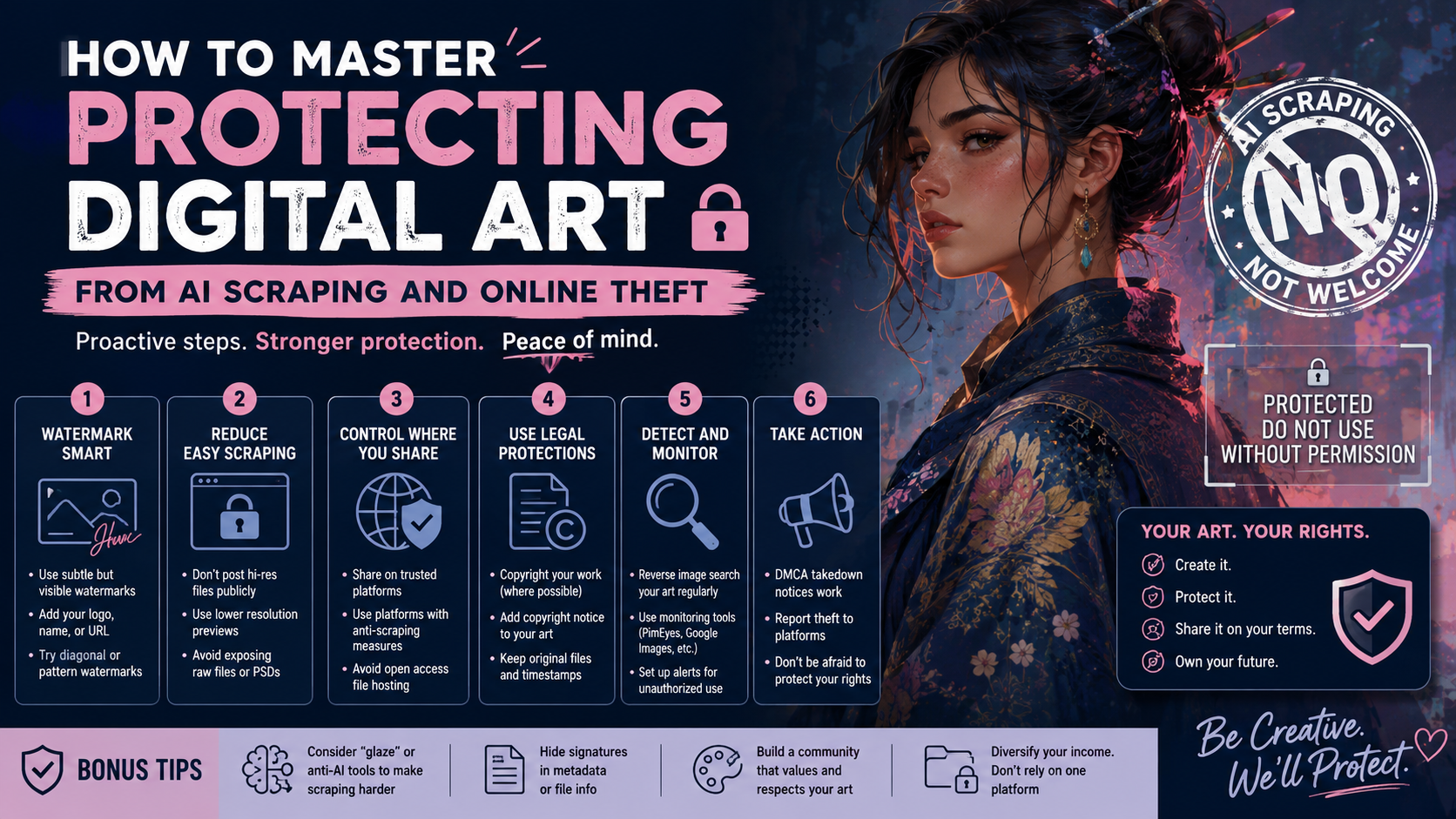
Protecting digital art from AI scraping has become a top priority for creators in a landscape where portfolios are constantly harvested by unauthorized bots. As an artist, your style is your signature, yet without the right safeguards, your unique aesthetic can be ingested into a machine-learning model in seconds. To maintain your professional edge and financial security, you must move beyond basic watermarks and adopt a modern, multi-layered defense to keep your work out of AI training sets and away from content scrapers.
If you don’t take proactive steps to safeguard your files, you aren’t just losing “likes”—you’re losing control over your professional brand and future revenue. Protecting your art requires a multi-layered defense strategy that combines technical “poison,” smart metadata, and legal deterrents.
Keypoint Summary: Protecting Your Digital Art
- Prevent AI Scraping: Utilize “adversarial” software like Glaze to mask your artistic style from machine eyes.
- Technical Shields: Configure your website’s
robots.txtand meta tags to explicitly block AI crawlers. - Resolution Control: Upload web-ready, low-DPI versions of your work to prevent high-quality printing theft.
- Active Monitoring: Leverage reverse-image search and DMCA automation tools to catch infringers early.
- Strategic Metadata: Embed copyright info directly into the image file to maintain ownership tracking.
1. The Problem: The Rising Tide of Digital Theft
For years, the main concern for artists was someone reposting a painting without credit. Today, the problem is industrialized. Image scraping bots crawl thousands of sites per minute, feeding or “training” generative AI models.
2. Agitating the Risk: What’s Really at Stake?
According to research from the World Intellectual Property Organization (WIPO), the legal landscape regarding AI and copyright is still shifting, leaving many creators in a vulnerable “gray area.” If your work is ingested into a dataset today, it is nearly impossible to “un-learn” that data later.
Ignoring these threats can have a devastating impact on your career:
- Institutional Theft: Your unique aesthetic can be mimicked by AI, allowing users to generate “in the style of” images based on your lifetime of work—for free.
- Lost Licensing Revenue: If a low-quality version of your art is available on a “free wallpaper” site, it devalues the high-res prints you sell in your shop.
- SEO Damage: Scraper sites can sometimes outrank your original portfolio on Google, stealing your traffic and potential clients.
3. The Solution: A Proactive Defense Strategy
Step 1: Use “Adversarial” Tools (Glaze & Nightshade)
The most innovative way to fight AI scraping is by using tools developed by the University of Chicago.
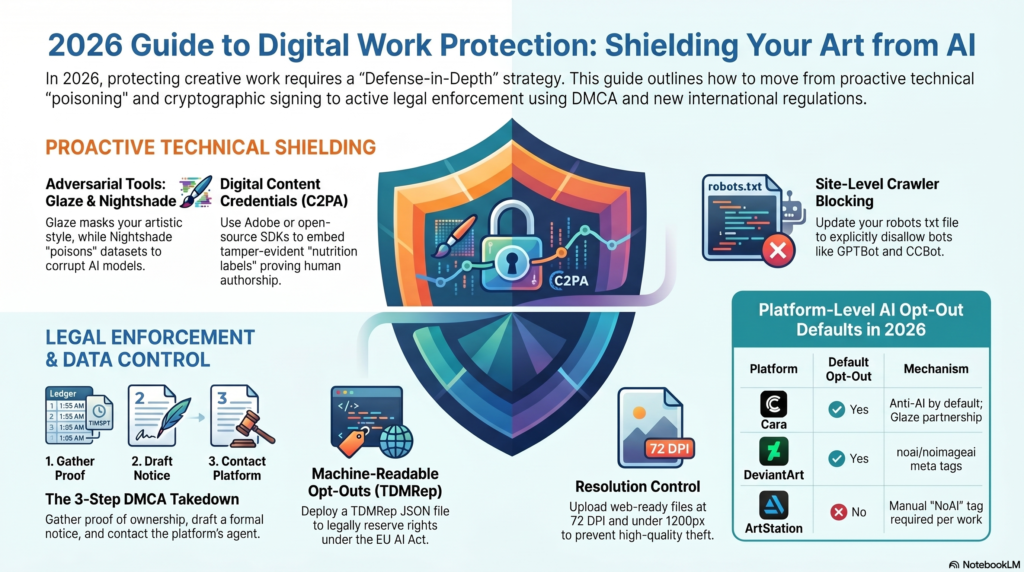
- Glaze: It makes tiny, invisible changes to your pixels. To a human, it looks like your painting. To an AI, the “style” appears as something completely different (e.g., oil painting might look like charcoal to the bot).
- Nightshade: This tool “poisons” the data. If a model scrapes “shaded” images, it begins to see dogs as cats or cars as cows, effectively breaking the AI’s ability to replicate your work accurately.
Step 2: Optimize Your Website’s “Robots.txt”
If you host your own portfolio, you can tell the most common AI bots to stay away. Add these lines to your site’s robots.txt file:
User-agent: GPTBot
Disallow: /

User-agent: CCBot
Disallow: /

User-agent: Google-Extended
Disallow: /
Note: While many reputable bots follow these rules, “bad” bots may ignore them. This is a deterrent, not a lock.
Step 3: Strategic Watermarking and Metadata
A watermark shouldn’t just sit in the corner where it can be cropped.
- The Tiling Method: Use a low-opacity, repeating logo over the most detailed parts of the art.
- IPTC Metadata: Ensure your contact info and copyright status are embedded in the file’s metadata. Check your settings in Photoshop or Lightroom to ensure “Export Metadata” is turned on.
Step 4: Downsampling for Public View
The biggest mistake most artists make is uploading a 300 DPI, 4000px file. For web viewing:
- Lower the Resolution: Keep images at 72 DPI.
- Limit Dimensions: Stay under 1200px on the longest side. This is plenty for a screen but produces a blurry, unusable print for thieves.
Step 5: Professional Monitoring & Takedowns
You don’t have to manually search for your art every day. Use automated services to do the heavy lifting:
- Pixsy: This platform monitors the web for your images and provides an easy way to send legally binding DMCA takedown notices.
- Google Lens: Periodically right-click your own work and select “Search image with Google” to see where it has migrated.
Key Takeaways for Success
- Be Proactive: It is much easier to protect an image before uploading it than to chase a thief afterward.
- Hybrid Defense: Don’t rely on just a watermark; use a combination of low resolution, Glaze, and metadata.
- Register Your Copyright: For high-value works, consider registering with the U.S. Copyright Office. This grants you the right to seek statutory damages in court, which is a massive deterrent for corporate infringers.
Need more professional art tips? Stay tuned to the ProminentPainting.com blog for the latest in art technique, business, and digital security.
⚠️ Disclaimer
The information provided in this video is for educational and informational purposes only and does not constitute legal advice. While the tools and methods discussed (such as Glaze, Nightshade, C2PA, and DMCA takedowns) can significantly enhance the security and integrity of your digital assets, no method can guarantee absolute protection against all forms of digital theft or unauthorized scraping. For specific legal advice regarding copyright infringement or intellectual property protection, please consult with a qualified attorney.
Frequently Asked Questions
1. What is the difference between Glaze and Nightshade?
While both tools were developed by the University of Chicago to protect creators, they serve two different defensive purposes:
- Glaze is a defensive shield. It makes subtle, pixel-level changes to your art that are invisible to humans but confuse AI models regarding your specific artistic style (e.g., making an oil painting look like charcoal to a scraper).
- Nightshade is an offensive tool. It acts as a data “poison” that corrupts the training data itself. If an AI model scrapes enough Nightshade-protected images, it breaks the model’s ability to understand labels—causing it to generate images of hats when a user prompts for a shoe.
2. Do tools like Glaze and Nightshade ruin the visual quality of my art?
For the vast majority of viewers, the changes are barely noticeable, especially on mobile devices or lower-resolution displays. You may notice a slight texture change, mild pixelation, or faint artifacting in certain lighting or solid-color blocks. However, most artists find this minimal visual trade-off entirely worth the massive boost in intellectual property security.
3. If I block bots in my robots.txt file, is my art 100% safe from AI scraping?
Unfortunately, no. A robots.txt file acts like a “No Trespassing” sign—reputable tech companies (like OpenAI or Google) generally respect it, but malicious scrapers and “bad” bots will simply ignore it. This is why a multi-layered defense (combining robots.txt with Glaze and low-resolution uploads) is absolutely necessary.
4. Can AI-generated watermarks or filters be removed by thieves?
Yes. Basic, corner-placed watermarks can be easily cropped out or erased using content-aware fill tools and AI object removers. To counter this, use a tiled, low-opacity watermark across the most detailed focal points of your image, which makes clean removal incredibly difficult without ruining the artwork itself.
5. Why should I upload images at 72 DPI if screens can display higher resolutions?
While modern screens (like Retina displays) can render higher pixel densities, keeping your public uploads at 72 DPI and under 1200 pixels on the longest side ensures your work looks crisp on a website but turns into a blurry, pixelated mess if someone attempts to print it on physical merchandise or a canvas.
6. Is it worth registering my copyright if I live outside the United States?
Yes. Even if you are a non-U.S. creator, registering your work with the U.S. Copyright Office is highly beneficial if your primary market, audience, or the platforms hosting the infringed work (like Instagram, OpenAI, or Adobe) are based in the United States. It grants you the legal right to seek statutory damages and attorney fees, which gives your legal notices significantly more teeth.